
Customizing Reminder Timing
Configure when appointment reminders are sent, set quiet hours, and manage patient opt-out preferences.
The Anatomy of a Reminder Cadence
Reminders work because they arrive at decision moments. Two days out, a patient can still rearrange work or childcare — so the 48-hour reminder is the reschedule opportunity. One day out, plans are set — the 24-hour reminder cements the commitment. On the morning itself, the morning-of confirmation catches the honest forgetters. Three touches, three different psychological jobs; together they're why reminder systems beat any single text.
Tuning the Leads to Your Patients
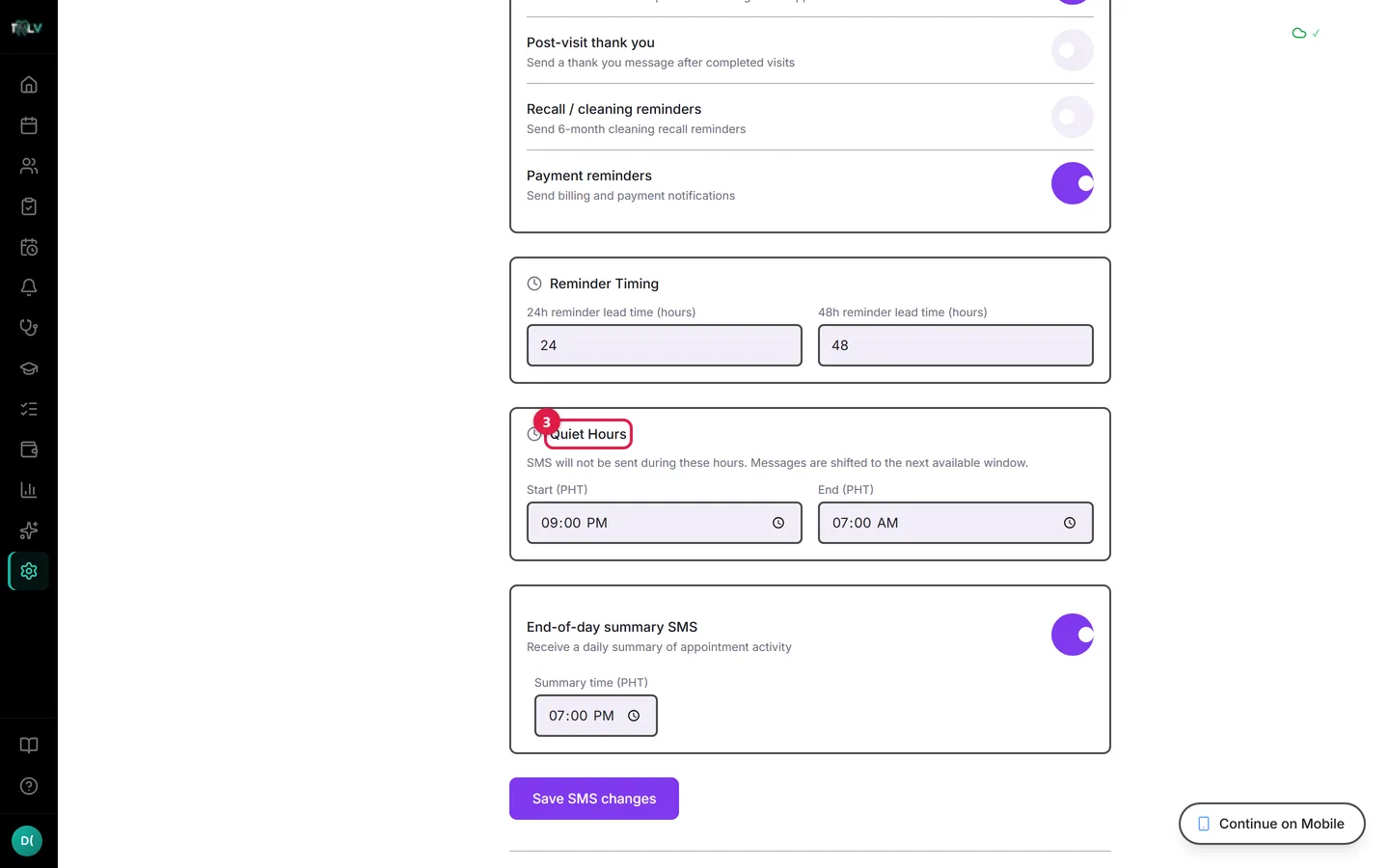
In Settings > SMS > Reminder Timing:
- 24h reminder lead time — anywhere from 12 to 36 hours before the appointment.
- 48h reminder lead time — anywhere from 36 to 72 hours before.
Read your own book to choose. A commuter-heavy urban clinic whose patients juggle shift schedules benefits from longer leads (36 and 72) — people need runway to rearrange. A neighborhood practice where patients live ten minutes away can shorten both and stay out of their way. If patients frequently reply asking to move the appointment, that's a sign your leads are too short to be useful for rescheduling.
Quiet Hours: The Courtesy Guarantee
No automated message sends inside your Quiet Hours (default 9:00 PM–7:00 AM, Philippine time). A reminder that would mathematically land at 10 PM waits for the morning window instead. Two consequences worth understanding:
- A "24-hour" reminder for a 7 AM appointment may actually arrive the prior morning — earlier than 24 hours, never ruder than your quiet window.
- If you adjust quiet hours, think in your patients' rhythm, not the clinic's: the default 9 PM cutoff exists because a 10:30 PM "reminder" reads as an intrusion, and an annoyed patient is one STOP reply away from never receiving anything again.
After the Visit and Beyond
The cadence doesn't end at the appointment: the post-visit thank you goes out after completion, recall reminders cover 6-month cleanings, and payment reminders nudge outstanding balances — each its own toggle in Settings > SMS, each respecting the same quiet hours.
When a Reminder Didn't Arrive
Work the list in order: the patient has no phone number on file; they opted out (check the Patient Opt-Out List); or the category is toggled off. Then check Reminders > SMS Log, which shows every message and its status — including Blocked for opt-outs and Failed with a retry button for carrier hiccups. The log ends most "the system didn't text me" conversations in under a minute.
Was this article helpful?
Need more help? Contact our support team