
Creating and Managing Treatment Plans
How to create treatment plans, define phases, track progress, manage payments, and link appointments for comprehensive patient care.
Why Plans Beat Quotes on Paper
A treatment plan in DentalView is three things at once: a clinical roadmap (what happens in what order), a financial agreement (what it costs and what's been paid), and a progress tracker (which phases are done). Because it's linked to the chart, the schedule, and payments, it stays true as work proceeds — unlike the paper quote that dies in a drawer. Multi-visit dentistry — root canal then post then crown, or quadrant-by-quadrant perio therapy — is exactly what phases are for.
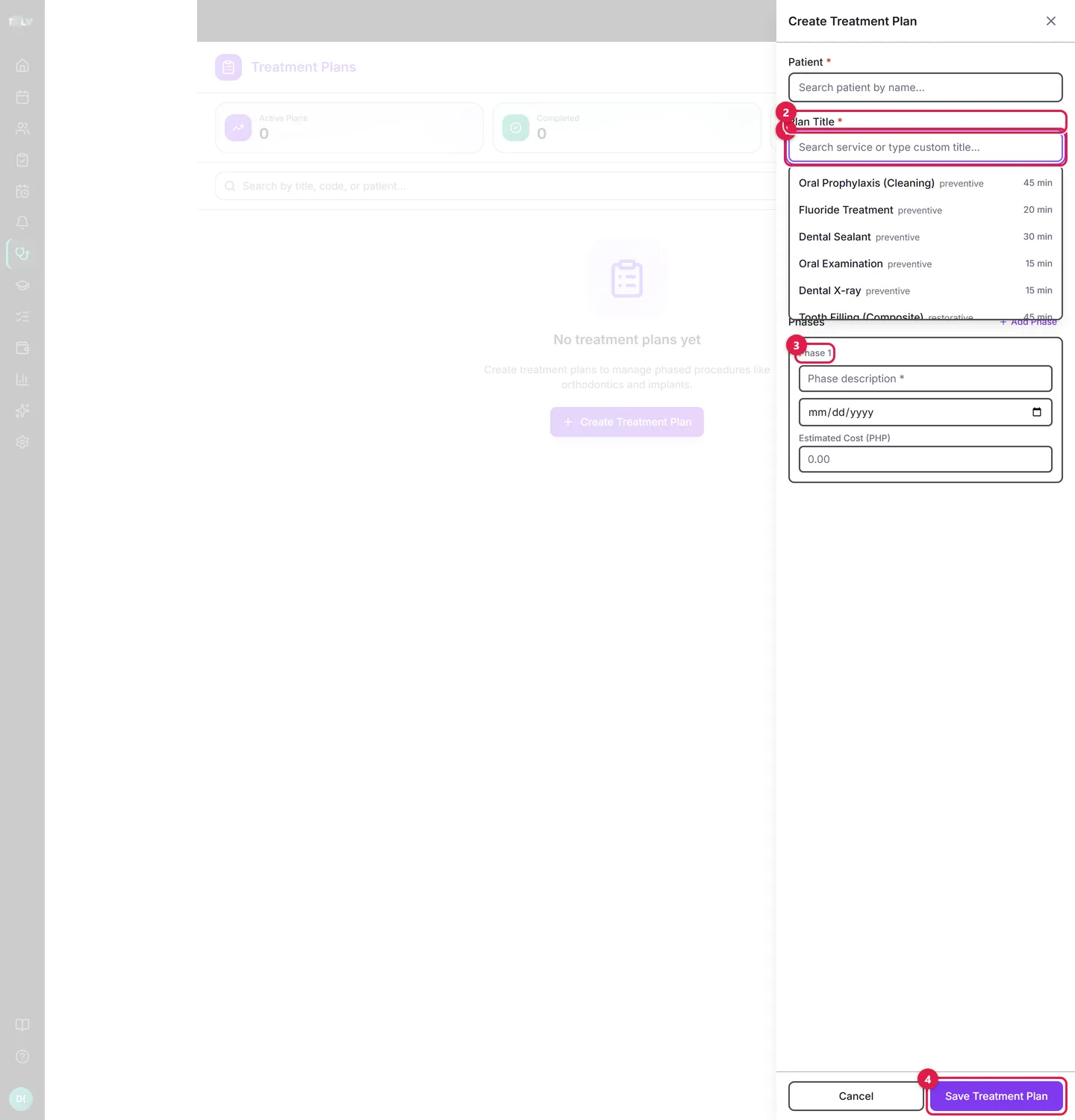
On this form: ① Patient — search and select who the plan is for. ② Plan Title — pick one of your services (it auto-fills Phase 1) or type a custom title. ③ Phase 1 — every plan is built from phases: each has a description, an optional target date, and an estimated cost; use Add Phase for multi-visit work. ④ Save Treatment Plan — creates it as Draft (still quoting) or Active (agreed), whichever status you picked above.
Building a Plan
- Open Treatments in the sidebar and click Create Treatment Plan.
- Search and select the Patient.
- Set the Plan Title — pick one of your services (it auto-fills Phase 1 with that service) or type a custom title like "Full mouth rehabilitation, upper right".
- Build the Phases — one phase per visit or per clinical stage. Each takes a description, an optional target date, an Estimated Cost (PHP), and linked services. Use Add Phase as needed.
- Choose the status — Draft while you're still quoting, Active once the patient agrees — and Save Treatment Plan.
The shortcut worth knowing: chart the planned work on the Dental Chart first, and the banner there offers Create treatment plan — one click drafts the plan with every planned tooth already in it.
Phasing Well
Good phases match visits, not procedures. "Phase 1: emergency extraction 38 + medication", "Phase 2: scaling and root planing, quadrants I–II", "Phase 3: composite restorations 14, 15" — each phase is something a patient can book, sit through, and pay for. Give each a realistic target date; those dates can power treatment-phase reminders so patients get an SMS when a phase is coming due.
Working Through the Plan
On the plan page every phase has its own lifecycle: Start when the visit begins, Mark Complete when done, Skip when a phase becomes unnecessary, Revert to Pending for mistakes. The Phase Progress bar tracks completion. Two integrations do the bookkeeping for you:
- Completing a phase offers a "Record what was done" checklist that writes the procedures straight into the patient's Case Record.
- Phases can be linked to appointments (Link Appointment), and completing that appointment can complete the phase.
The Money Side
Each phase's estimated cost rolls into the plan's Estimated Total; payments recorded against the patient show as a paid percentage and "{amount} left" on the plan card, and fully paid plans say so. This makes installment dentistry honest: the patient sees exactly what remains after every payment, and your front desk sees which active plans still carry balances (sort the list by Balance: High–Low at collection time).
Statuses, Search, Cleanup
Plans run Draft → Active → Completed, with Cancelled as the exit (reactivatable if the patient returns). The list defaults to Active Work — drafts plus active — so finished business stays out of the way; switch the status filter to see everything. From the row menu: Cancel plan, Reactivate plan, Delete draft (only drafts with zero payments), and for owners Delete permanently — reserve the last one for genuine test data.
The Patient-Facing Artifact
Download PDF on the plan page produces a printable document with the phases and costs — the thing you hand across the desk for informed consent and financing conversations. A signed printout of that PDF in the patient's folder plus the live plan in the system is a complete, defensible treatment agreement.
Was this article helpful?
Need more help? Contact our support team