Configuring Your Notification Preferences
Learn how to toggle notification types, set digest preferences, and choose between push and SMS channels.
Your Alerts, Not the Patients'
Two different message systems leave your clinic, and confusing them is the most common settings mix-up. Settings > SMS governs what patients receive — reminders, recalls, confirmations. Settings > Notifications, this page, governs what you and your staff receive about the clinic's own pulse. Keep the distinction and both pages make sense.
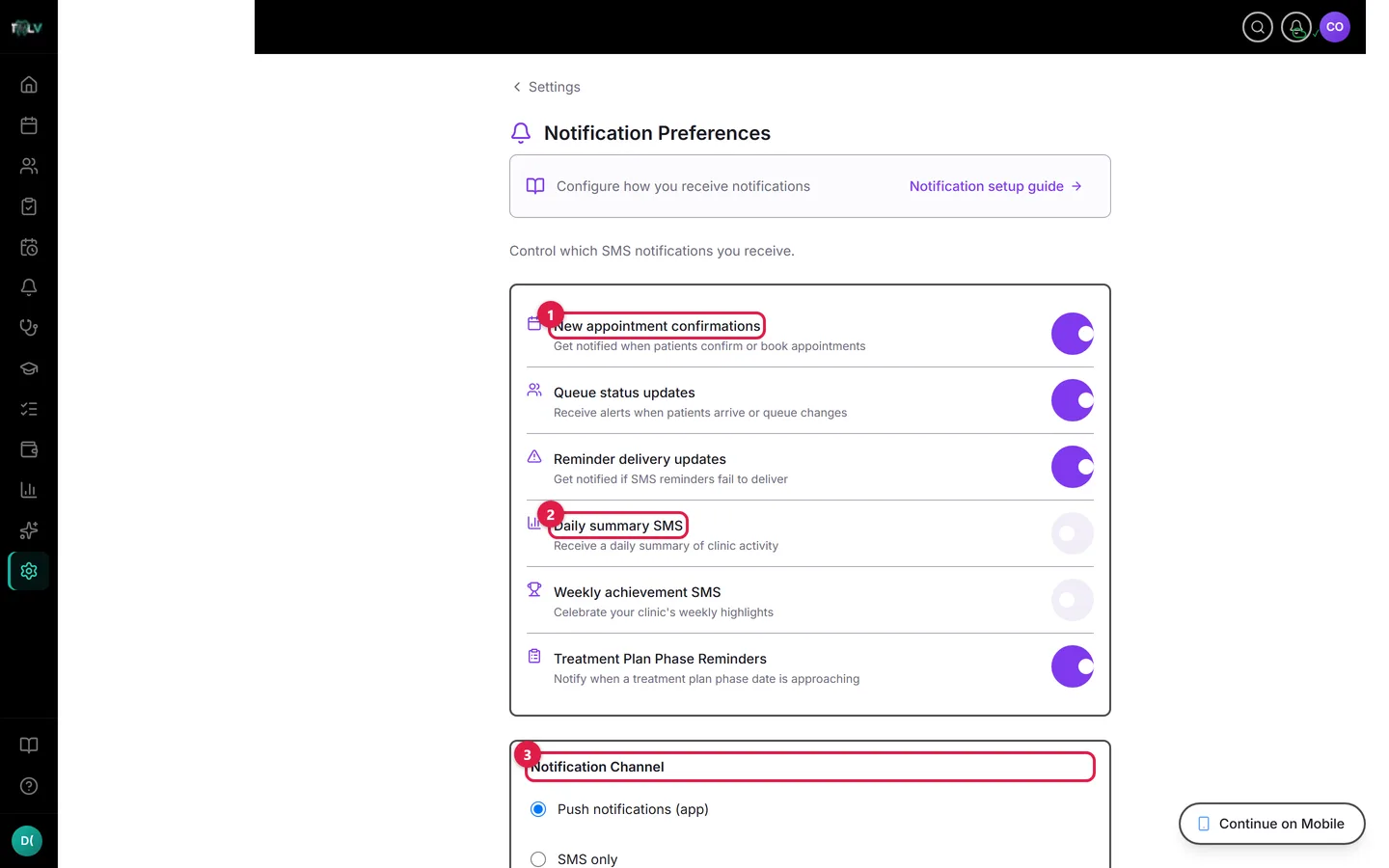
On this screen: ① Alert toggles — each row is one type of staff alert: appointment confirmations, queue updates, failed-reminder alerts, and more. ② Daily summary SMS — your clinic's end-of-day numbers, at the time you choose. ③ Notification Channel — push (mobile app), SMS only, or both; push needs the DentalView app installed.
The Alert Toggles, and Who Should Want Them
- New appointment confirmations — a ping when patients book or confirm. Essential with online booking on: it's how the desk learns the internet just filled a slot.
- Queue status updates — arrivals and queue movement. Useful for dentists working away from the front desk; noisy for everyone else in a small clinic where the waiting room is visible from every chair.
- Reminder delivery updates — an alert when a patient reminder fails to deliver. Turn this on and keep it on: a failed 24h reminder that nobody notices is tomorrow's unexplained no-show. This alert converts silent failures into a quick phone call.
- Daily summary SMS — the day's numbers at your chosen time (any 15-minute step between 06:00 and 23:45). Most owners set it for just after closing.
- Weekly achievement SMS — the week's highlight, on the day and time you pick. Monday morning makes it a plan; Saturday evening makes it a scoreboard.
- Treatment Plan Phase Reminders — a nudge when a plan phase's target date approaches, so multi-visit cases don't stall silently between appointments.
Choosing the Channel
The Notification Channel picker offers Push notifications (app), SMS only, or Both. Push needs the DentalView mobile app installed; on web-only setups, staff alerts arrive by SMS to the number in Settings > Account. "Both" suits owners who want the daily summary to survive a dead phone battery; "Push only" suits staff who live in the app all day and don't need duplicate texts.
Click Save changes when done.
Two Cross-References Worth Knowing
Your own mobile number comes from Settings > Account > Phone Number — an alert channel is only as good as the number it points to. And note there's a related-but-different End-of-day summary SMS toggle inside Settings > SMS; if you're changing digest behavior and it doesn't seem to take, check both pages — they're separate switches.
Was this article helpful?
Need more help? Contact our support team